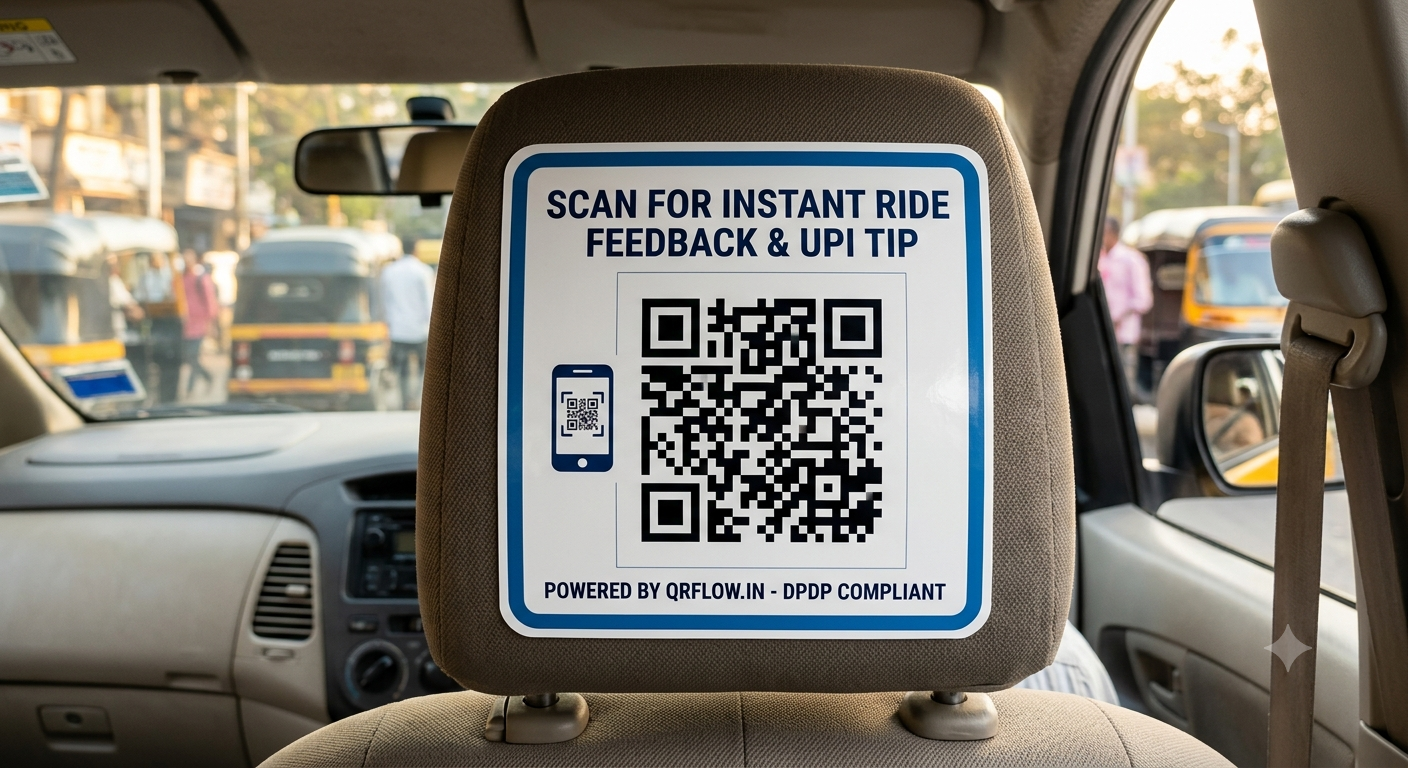
Mobility platforms and fleet operators spend lakhs on printing and deploying in-cab sticker collateral—from seatback headrest tags to window decals. However, up to 40% of physical print campaigns fail due to broken URLs, static landing pages, or poor visual formatting. When a passenger scans a static QR code and encounters a dead link, a slow-loading site, or an unoptimized page, the engagement is permanently lost. Replacing thousands of physical headrest stickers across a fleet to update a campaign URL incurs massive print, logistics, and downtime costs.
In physical-to-digital (Phygital) marketing, offline-to-online (O2O) attribution requires dynamic URL management. Static codes hardcode destination URLs into the vector matrix, meaning any change requires reprinting the sticker. Dynamic QR codes route through managed server endpoints using server-side redirects, allowing marketing teams to update destinations, run A/B split tests, and swap promotions instantly without replacing a single piece of vinyl in the car.
Designing Effective In-Cab Sticker Layouts: Headrest Ergonomics & Best Practices
In-cab advertising targets a captive audience with an average dwell time of 20 to 45 minutes across metro areas like Bengaluru, Mumbai, and Delhi-NCR. However, visual distance, vehicle vibration, and ambient light conditions drastically impact scan success rates.
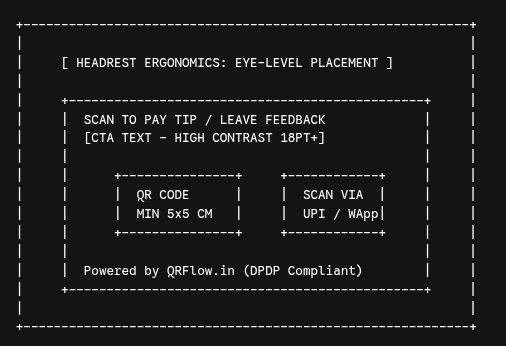
Key Design & Layout Parameters for Headrests
- Optimal Distance & Size Ratio: Rear passengers sit 50 cm to 80 cm away from the front headrest. The minimum printable QR matrix size must be at least 5 cm × 5 cm (excluding the quiet zone outer margin) to allow standard smartphone cameras to focus instantly without manual zooming.
- High-Contrast Quiet Zones: Maintain a clear margin (quiet zone) around the QR code equal to four times the width of a single module (data square). Use dark foreground modules on a stark white or light-colored background. Avoid metallic or glossy vinyl finishes that cause headlight or sunlight glare.
- Call-to-Action (CTA) Positioning: Place bold, action-oriented typography directly above or below the QR code (e.g., "Scan for Instant UPI Tip & Driver Rating" or "Scan to Connect to Free In-Cab Wi-Fi").
- GS1 Data Matrix & Error Correction: Apply Error Correction Level H (up to 30% restoration) so that scuffs, scratches, or passenger wear on the physical sticker will not prevent successful camera decoding.
Static vs. QRFlow Dynamic In-Cab QR Codes
| Feature / Metric | Generic Static QR Codes | QRFlow Dynamic QR Platform |
|---|---|---|
| URL Management | Fixed URL hardcoded at generation | Instant URL updates via dashboard without reprinting stickers |
| Redirect Architecture | Direct connection (No intermediary optimization) | 301/302 managed redirects with latency optimization |
| Scan Attribution | None (Zero visibility into user behavior) | Granular attribution (City, OS, Device, Time of Day, IP Location) |
| India Tech Integrations | Web landing page only | Direct WhatsApp API launch & Instant UPI Intent flows |
| Data Protection | Unregulated third-party tracking | Fully compliant with India's DPDP Act 2023 |
| Data Redundancy | Low (Corrupted if scratched >10%) | High (Level H error correction handles up to 30% damage) |
| Custom Branding | Generic black-and-white blocks | Custom vectors, brand colors, embedded logos, and custom callouts |
5 Deep-Dive Mobility Use Cases for the Indian Market
1. Seamless UPI Driver Tipping and Service Rating
Passengers frequently prefer rewarding excellent service, but lack physical cash. By mounting a dynamic QR code on the front passenger headrest, riders can instantly scan using Paytm, PhonePe, Google Pay, or BHIM. QRFlow routes the request through a lightweight UPI Intent protocol, opening the user's preferred UPI app directly with pre-filled driver identifiers while masking sensitive personal account details.
2. WhatsApp Business Support & Ride Feedback
Instead of forcing passengers to navigate complex in-app support forms during a trip, a headrest QR code can trigger a pre-formatted WhatsApp chat session. By leveraging WhatsApp Deep Links ([https://wa.me/](https://wa.me/)), passengers click scan to initiate a conversation with customer support, report an AC issue, or leave real-time ride feedback directly within their primary messaging app.
3. In-Transit Phygital E-Commerce & OTT App Downloads
Turn passive passenger commute time into monetization channels. Fleet operators can partner with quick-commerce brands, OTT platforms, or local entertainment apps. Scanning the sticker directs users to targeted app store listings or exclusive discount portals, with complete O2O attribution tracking which vehicle fleet generated the conversion.
4. Enterprise Driver Onboarding & KYC Verification
Fleet operators recruitment teams install specialized QR decals on hub banners or driver-side dashboards. Prospective drivers scan the code to start automated WhatsApp verification workflows, upload Aadhaar/Driving License copies securely, and complete onboarding documentation on the go.
5. Smart Cab Wi-Fi Captive Portals
For premium mobility services (e.g., airport transfers, electric ride fleets), headrest QR codes streamline guest Wi-Fi access. Passengers scan the sticker, land on a high-speed captive portal built on dynamic URLs, and authenticate via OTP using their mobile number without needing complex network passwords.
Technical Superiority: Managed Redirects, Analytics & DPDP Compliance
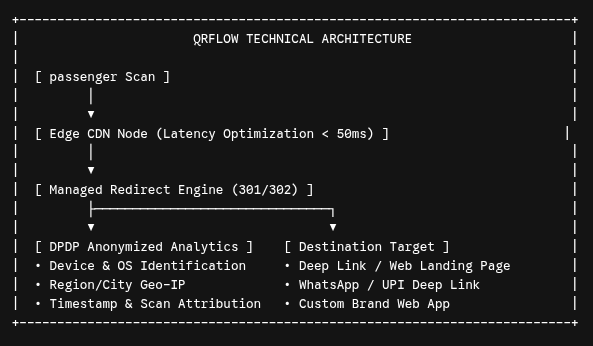
Sub-Second Latency Optimization
In mobility environments, network connectivity shifts rapidly between 4G, 5G, and cellular dead zones. QRFlow's backend infrastructure employs global edge routing and lightweight 301/302 redirects. This minimizes DNS resolution time and ensures destination pages load in under 50ms, mitigating scan drop-offs caused by network latency.
Deep Scan Attribution & Analytics
Understanding passenger behavior requires robust data. QRFlow provides enterprise-grade scan attribution analytics:
- Device & Operating System Detection: Distinguish between iOS and Android users to deliver tailored app store deep links.
- Geographic Insights: Track scan distribution by city and region using privacy-safe IP location resolution.
- Time-Series Analysis: Map scan volumes against peak commute hours (morning/evening rush hours) to optimize campaign delivery schedules.
Compliance with Digital Personal Data Protection (DPDP) Act 2023
Data privacy regulations in India require strict compliance regarding passenger data collection. Free, unmanaged QR generators often track users aggressively or inject untrusted third-party cookies. QRFlow routes all redirect data through encrypted, privacy-first endpoints that do not harvest Personally Identifiable Information (PII) without explicit consent, keeping your business fully compliant with DPDP guidelines.
3-Step Implementation Guide on QRFlow
Setting up dynamic, high-converting headrest sticker campaigns takes only a few minutes.
- Create Your Account: Visit the QRFlow Registration Page to activate your account. If you already have an active subscription, access your workspace directly via the QRFlow Login Portal.
- Design Your In-Cab QR Sticker: Navigate to the QRFlow Features Dashboard. Select Dynamic QR, input your initial destination URL (or WhatsApp/UPI deep link), apply high-contrast brand colors, embed your company logo, and download high-resolution SVG or EPS vector formats ready for physical printing.
- Deploy & Track Analytics: Affix stickers at eye level on passenger headrests. Review real-time performance, monitor conversion counts, update destination links dynamically, and adjust campaign strategy by visiting QRFlow Pricing Plans to scale up scan limits across your entire fleet.
Frequently Asked Questions (FAQ)
1. Why are dynamic QR codes better than static ones for vehicle sticker printing?
Static QR codes cannot be modified once printed. If your campaign link, landing page, or offer changes, every physical sticker in your fleet must be removed and replaced. Dynamic QR codes utilize managed server-side redirects, allowing you to update the target link instantly through your dashboard while keeping the exact same printed sticker on the headrest.
2. Is QRFlow fully compliant with India's DPDP Act 2023?
Yes. QRFlow is built with strict privacy controls. Our scan attribution engines collect essential operational metrics (device OS, regional location, timestamps) without harvesting personal identifiers without consent, ensuring full alignment with Indian data privacy mandates.
3. Can I integrate direct UPI payment and WhatsApp links into my headrest stickers?
Yes. QRFlow supports deep-link generation for Indian digital infrastructure. You can create QR codes that directly launch UPI payment applications (PhonePe, Paytm, Google Pay) with pre-filled payees, or open automated WhatsApp Business chats for instant passenger assistance and feedback.
4. Can I claim GST input tax credit on QRFlow subscription plans?
Yes. All QRFlow Pricing Plans include tax invoices with full GST compliance, allowing business accounts across India to claim Input Tax Credit (ITC) seamlessly.
5. What happens if a headrest sticker gets scratched or worn down over time?
QRFlow generates print-ready vector files configured with High (Level H) error correction capability. This allows the QR code to remain 100% scannable even if up to 30% of the sticker surface is damaged, scratched, or obscured.
For custom enterprise solutions, white-label routing, or fleet-wide API access, contact our technical integration team at the QRFlow Contact Portal.